DocuPro
Paperless office

Paperless office software that meets paper where it arrives

Going paperless is not one decision; it is a capture path for every way paper enters and leaves your organization. DocuPro covers each of them — scan, print, email, and the archive — and gives the resulting documents somewhere better to live than a folder.

Four ways paper shows up — and the DocuPro path for each

Paper that arrives by mail
Batch scanning with Patch-T separator sheets
Drop a separator sheet between documents, scan the whole stack, and DocuPro splits it into individual documents. Scanner profiles and batch indexing keep large volumes moving without hand-sorting.
Documents born in Windows applications
GoDocuPro VPD virtual print driver
Anything you would have printed — a report, a web page, a spreadsheet, a confirmation — prints to the GoDocuPro VPD printer instead and files into DocuPro, indexed on the way in. No paper is created.
Documents that arrive by email
Outlook add-in and per-user import email
File a message and its attachments from the Outlook ribbon, or forward mail to your import address. Attachments land as indexed documents; nobody prints an email to file it.
The paper archive in the basement
Bulk import jobs
Scan the backlog once, then load it with bulk import jobs tuned to your hardware — parallel processing, metadata mapped onto index fields, failed uploads listed and retried.

Scan a stack, get indexed documents

Patch-T separator sheets tell DocuPro where one document ends and the next begins. Scan the whole batch; DocuPro splits it, and batch indexing assigns document type and index values.
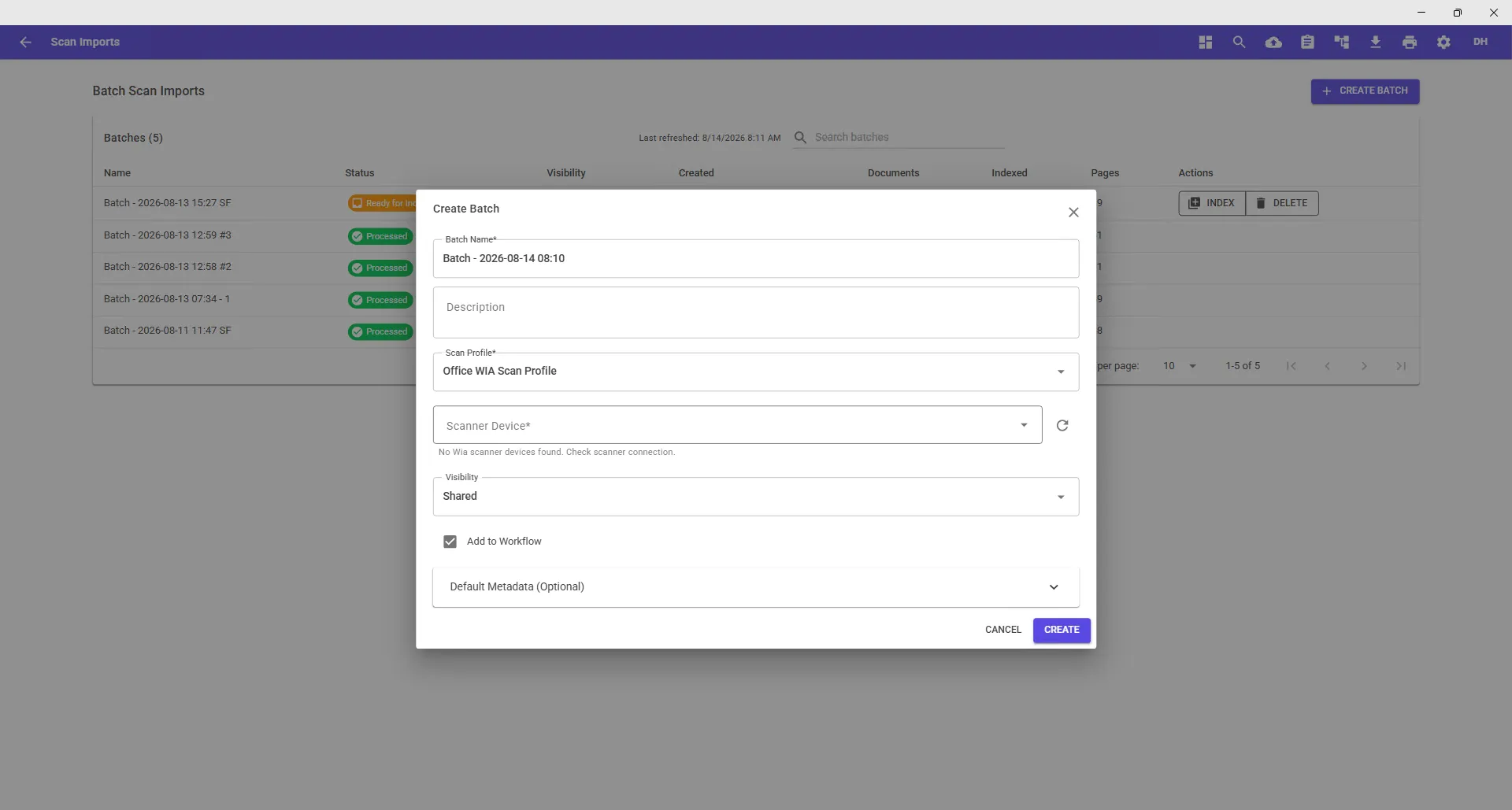
DocuPro Scan Imports screen creating a batch for paperless scanning
Scan Imports — one batch, many documents, split by separator sheet

Print to DocuPro instead of to paper

GoDocuPro VPD installs as a Windows printer. The document that would have gone to the tray goes into DocuPro, indexed, with no paper created at all.
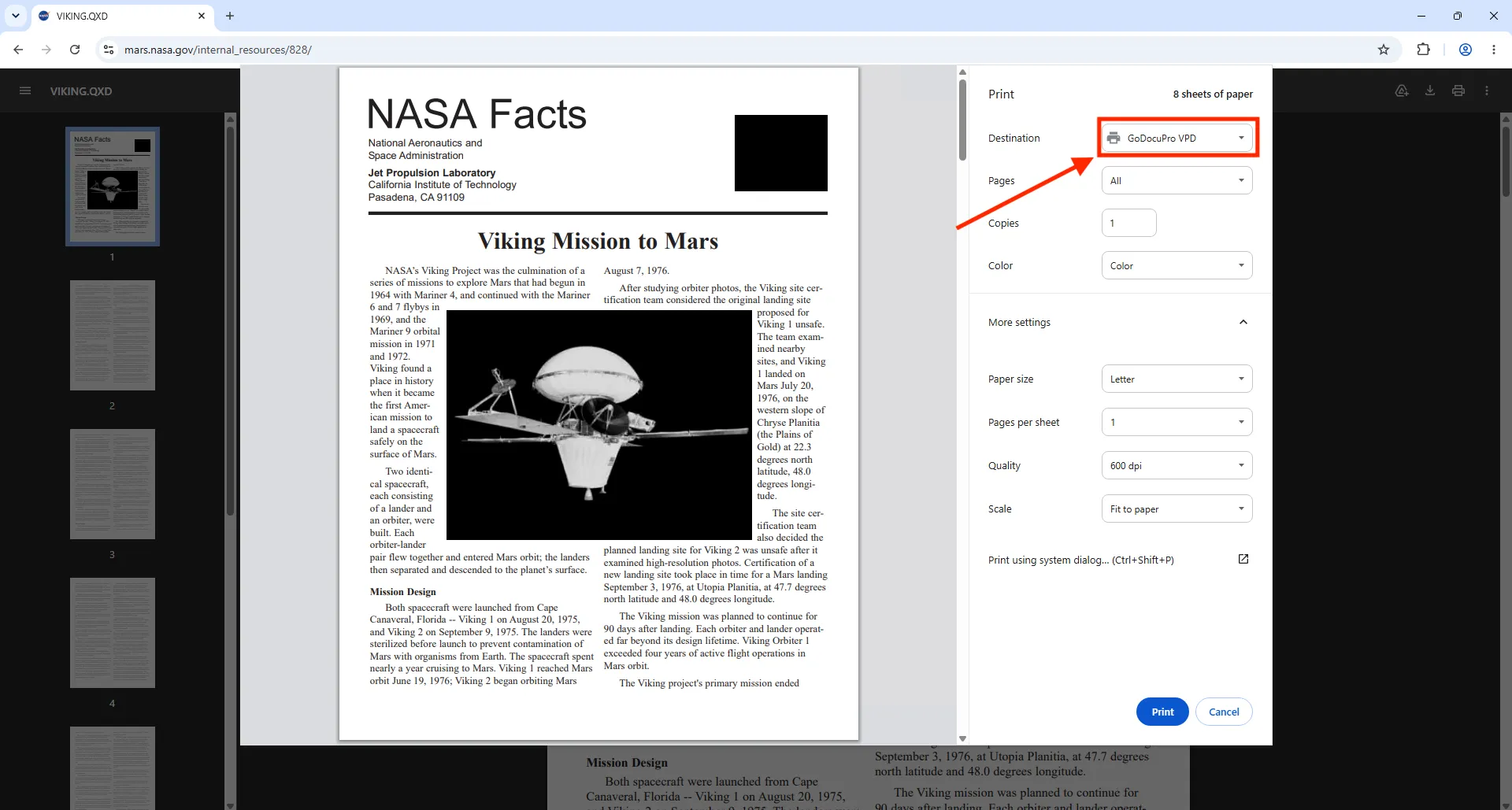
Printing to the GoDocuPro VPD virtual printer instead of a paper printer
Print anything to GoDocuPro VPD
Stop printing email
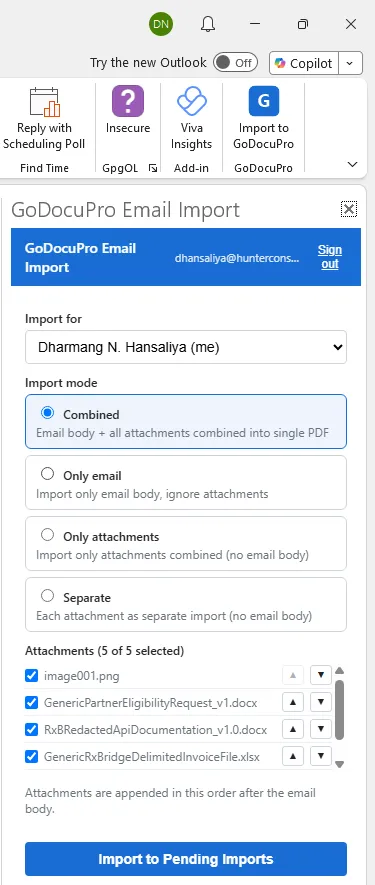
File a message and its attachments from the Outlook ribbon, indexed on the way in. Not on Outlook? Every user gets an import email address that accepts forwarded mail and attachments.
DocuPro Outlook add-in filing an email into the document management system

What paperless looks like after capture

Findable in seconds
Keyword search over index fields replaces the walk to the file room. Deep links open a document from your other applications.
Secured by metadata, not by lock and key
Entra ID SSO, user groups, folder permissions, and index-based security rules control who can see each document — everywhere in the application.
Routed instead of carried
Workflows move documents through review and approval with tasks, queues, and notifications. Nobody hand-delivers a folder to a manager.
Signed, stamped, and versioned on screen
Annotations, signature stamps, PAID/APPROVED stamps, split and merge — in the viewer, with version history and the original retained.

Paperless office FAQ

What does “paperless office” actually require?

Three things: a way to capture every document that would have been paper (scan, print-to-file, email), a place to store it with searchable metadata and access control, and a way to move it through approvals without printing. DocuPro provides all three on one Windows platform.

How do we handle the paper we already have?

Scan it in batches with separator sheets, then load it with bulk import jobs. Jobs run in parallel against your hardware, map existing metadata onto DocuPro index fields, and retry failures — repositories with millions of documents are the normal case.

Do staff need to change how they work?

Mostly no. They print to a different printer (GoDocuPro VPD), click a button in Outlook, or drop separator sheets in the scanner. Documents land in DocuPro indexed, and workflows follow the stages the team already uses.

Can we sign documents without printing them?

Yes. Signature and stamp annotations are applied in the built-in viewer, and each signed version is retained alongside the original.

Is DocuPro a paperless system for small businesses or large ones?

Both. The configuration model is the same; what changes is the number of document types, users, and the size of the import. Bulk import jobs are built for repositories with millions of documents, and a small team can start with a handful of document types.

Show us how your paper arrives today
Scanner, inbox, print, or an old system — we'll set up the capture path in a demo environment and walk you through it.
Request a demo
Configured around your documents, not a template.Request a demo